Organize, store, and read your e-books

If you own an ebook (electronic book) reader, or just feel like reading ebooks on your desktop or netbook, Calibre will help keep them organized.

Top Recommended Alternative
Let's read!

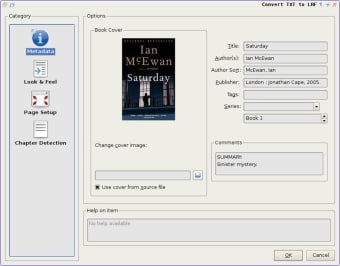
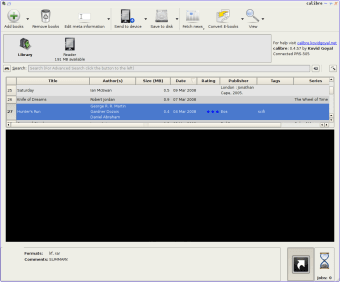
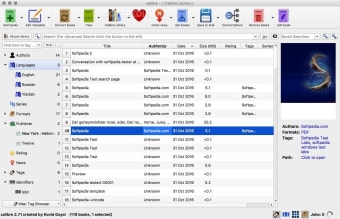
Calibre is a library for eBooks. It has a big, bold interface that's really easy to use, and ebook files of most formats can just be dragged into the Calibre window. Editing the metadata (title, genre etc) is just a case of hitting the button on the tool bar, and typing in your changes. You can select multiple books and edit them in bulk too, for example if you want to regroup some books in a particular genre.

Simple to use

Viewing is also just a button click, and opens an ebook reader window. Here you can increase or decrease the font size to your comfort, add bookmarks and more. You can also set Calibre to download feed from news websites, although the layout results are sometimes a bit odd. There is also, of course, ebook reader synchronizing, so you can easily keep your device up to date.

Good tool for all book lovers

Free, open-source and easy to use, Calibre is a great e-book library tool and reader.

Changes

Now converts all ebook formats to Microsoft Word (DOCX) files, including images and tables etc.

  • Pros

    • Convert, import and read your ebooks easily
    • Clear interface
  • Cons

    • RSS support isn't brilliant
 0/3

App specs

Also available in other platforms

Program available in other languages


Icon of program: Calibre

Calibre for PC

  • Free
  • 4
    2531
  • 451K
  • V9.2.1

User reviews about Calibre

4

13 reviews

Add review

Main reviews for you

  • Anonymous user

    I have been a long time fan of Calibre, first when it saved my library of over 1000 books when Fictionwise was bought out. Now, it is the only way my brother can follow the text while google play reads the books aloud. It seamlessly converts my kindle library into epub that i can quickly upload to google drive and open with google books.

  • Anonymous user

    It does a fantastic job of converting eBooks from one format to another; better than the online convertors.

  • Anonymous user

    It does an excellent job of converting eBooks from one format to another; better than the online convertors.

  • Anonymous user

    Must-have for Kindle. This is the easiest way to manage your library. Great as manager and converter. As if created by Amazon itself for the Kindle. Pros: Good converterGreat manager and organizer for books Cons: The design could have been better

  • Anonymous user

    Not a good option for those who need to save space in their HD . If you like me, want to save precious space in your PC Hard Drive and for this reason keep all your ebooks in an external storage device, then Calibre is not a good option. With Calibre, everytime you want to open a book stored in an external HD, it will automatically import the book from the external device to your PC HD so as to display it on its shelf and enable the reading. In my experience Stanza has been the best alternative to save space in my PC HD and be able to read from any external storage device, not to mention the possibility of reading and converting a good variety of ebook formats. The minus side of Stanza is that it cannot work without Java. A second good option is Adobe Digital Edition, but it only reads epubs and PDF formats. Pros: Simple to install Cons: Doesn't enable you to read books from external storage devices without first having to import them to its shelf, which means the taking up of space in you internal HD.

  • Anonymous user

    Calibre download has a virus. Calibre in earlier versions is super--easy to use, attractive gui, speedy...you do need to get Tools 4.8 or later and follow the directions (not easy) in order for Calibre to convert ebooks from one format to another, such as mobi or pdf to epub. Only problem is downloading it--you must first download "Download Manager" and that app has a virus--earlier versions of Calibre (4.33, for example) did not do this. Pros: earlier versions are excellent but need Tools 4.8 to handle conversions Cons: download manager/setup.exe contains a virus

More

You may also like

Alternatives to Calibre

Explore Apps

Related Articles

Latest articles

Laws concerning the use of this software vary from country to country. We do not encourage or condone the use of this program if it is in violation of these laws.
Softonic

Is Calibre safe?

100/100

Score result: Clean

This file passed a comprehensive security scan using VirusTotal technology. It is safe to download.

  • Virus free
  • Spyware free
  • Malware free
  • Verified by Security Partners

    VirusTotal logo

Scan Info

Last scan
Friday, February 20, 2026
Scan provider
VirusTotal · Full report

File Integrity

File
9.2.1.msi
SHA256
12e9190d2ee52a846c37827e7e1f525a7b43d2cf7b1f994c7631f147c04d0898
SHA1
2eda8ba15c3c1703ef7db3c0d6ee60d49bbf0072

Softonic security commitment

Calibre has been thoroughly scanned by our advanced security systems and verified by industry-leading partners. This file comes from the official developer and has passed all our security checks, showing no signs of viruses, malware, or spyware. For more information, visit our Security and Trust Center